Saturday, 1 October 2022

What is Recursion in Java? Program to print first five characters using recursive method in Java?


SDET Interview Question and Answers.  

Java Interview Question SET-01

Java INterview Question Set-02 ARRAY

Java INterview Questiona Set-03 MAP

Java INterview Question Set-04

Java is a very important topic for both developers and testers. It's very difficult to remember all the Java basics, so it's always wise to do a revision before the day of the interview. 

What is Recursion in Java?


Recursion works in Java the same way it works everywhere else. Recursion is, fundamentally, the process of solving a problem by reducing it to a smaller version of itself.

Recursion is the technique of making a function call itself. This technique provides a way to break complicated problems down into simple problems which are easier to solve.


In Java, a method that calls itself is known as a recursive method. This process is also known as recursion. A physical world example would be to place two parallel mirrors facing each other. Any object in between them will be reflected recursively.


Appium Interview Questions and Answers

Selenium Interview Questions and answers. 

GIT Interview Questions and Answers


Why do we need Recursion?

Recursion is made for solving problems that can be broken down into smaller, repetitive problems. It is especially good for working on things that have many possible branches and are too complex for an iterative approach . One good example of this would be searching through a file system


  1. import java.util.Scanner;
  2. public class recursion
  3. {
  4.     public static void main(String[] args) 
  5.     {
  6.         int n = 5;
  7.         Scanner s = new Scanner(System.in);
  8.         System.out.print("Enter any number:");
  9.         n = s.nextInt();
  10.         recursion obj = new recursion();
  11.         System.out.print("recursion numbers till "+n+" :");
  12.         obj. recursion(n,1);
  13.  
  14.  
  15.     }
  16.     int recursion(int y, int i)
  17.     {
  18.         if(i <= y)
  19.         {
  20.             System.out.print(i+" ");
  21.             return(recursion(y,++i));
  22.         }
  23.         return 1;
  24.     }
  25. }

 You can also find factorials using Recursion, very important for interview preparation:

Jenkins Interview Questions and Answers. 

TYPES of Recursion

There are several different recursion types and terms. These include:

  • Direct recursion: This is typified by the factorial implementation where the methods call itself.
  • Mutual recursion: This happens where one method, say method A, calls another method B, which then calls method A. This involves two or more methods that eventually create a circular call sequence.
  • Multi-recursion: Multiple recursive calls are made in the method.
  • Head recursion: The recursive call is made at the beginning of the method.
  • Tail recursion: The recursive call is the last statement.

Factorial of a Number Using Recursion

class Factorial {

    static int factorial( int n ) {
        if (n != 0)  // termination condition
            return n * factorial(n-1); // recursive call
        else
            return 1;
    }

    public static void main(String[] args) {
        int number = 4, result;
        result = factorial(number);
        System.out.println(number + " factorial = " + result);
    }
}

************************************************

✍️AUTHOR: LinkedIn Profile

************************************************

Learn (API-Microservice)Testing+ Selenium UI Automation-SDET with Self Paced Videos prepared by FAANG employee and LIVE Doubt Session 

SDET TRANING VIDEOS AVAILABLE with Live Doubt Session(course-1 below,API TRaining Videos With Class Notes and Coding Set) and (API+UI, both course-1 & 2 below) Check Training Page for Course Content or reach out @whatsapp +91-9619094122. 
This includes classnotes, 300+ interview questions, 3 projects, Java Coding question set for product companies along with career guidance from FAANG employees for Automation and SDET.

For more details whatsapp : https://lnkd.in/dnBWDM33


*************************************************

SeleniumWebdriver Automation Testing Interview Questions:

https://automationreinvented.blogspot.com/search/label/SeleniumWebdriver

API Testing Interview Question Set:

https://automationreinvented.blogspot.com/2022/03/top-80-api-testing-interview-questions.html

DevOps Interview Q&A:

https://automationreinvented.blogspot.com/2021/11/top-11-devops-interview-questions-and.html 

Kubernetes Interview Question Set

https://automationreinvented.blogspot.com/search/label/Kubernetes

Docker Interview Question Set

https://automationreinvented.blogspot.com/Docker

Linux Interview question Set

https://automationreinvented.blogspot.com/search/label/Linux

Automation Testing/SDET Framework Design

https://automationreinvented.blogspot.com/search/label/FrameworkDesign

Java Related Interview Question Set

https://automationreinvented.blogspot.com/search/label/Java

GIT Interview Question Set:

https://automationreinvented.blogspot.com/2021/09/top-40-git-interview-questions-and.html

Coding Interview Question Set:

https://automationreinvented.blogspot.com/search/label/Coding%20Questions

Mobile Testing Interview Question Set:

https://automationreinvented.blogspot.com/search/label/Mobile%20Testing

Python Interview Question Set for QAE - SDET - SDE:

https://automationreinvented.blogspot.com/search/label/Python


DevOps with serverless Jenkins and AWS CDK


SDET Interview Question and Answers.  

Jenkins Interview Questions and Answers. 

Appium Interview Questions and Answers

Selenium Interview Questions and answers. 

GIT Interview Questions and Answers

DevOps with Serverless Jenkins and AWS CDK

The objective of this post is to walk you through how to set up a completely serverless Jenkins environment on AWS Fargate using AWS Cloud Development Kit (AWS CDK).

Jenkins is a popular open-source automation server that provides hundreds of plugins to support building, testing, deploying, and automation. Jenkins uses a controller-agent architecture in which the controller is responsible for serving the web UI, stores the configurations and related data on disk, and delegates the jobs to the worker agents that run these jobs as their primary responsibility.

Amazon Elastic Container Service (Amazon ECS)  using Fargate is a fully-managed container orchestration service that helps you easily deploy, manage, and scale containerized applications. It deeply integrates with the rest of the AWS platform to provide a secure and easy-to-use solution for running container workloads in the cloud and now on your infrastructure. Fargate is a serverless, pay-as-you-go compute engine that lets you focus on building applications without managing servers. Fargate is compatible with both Amazon ECS and Amazon Elastic Kubernetes Service (Amazon EKS).


Most Used Docker Commands:Interview Question


Solution overview

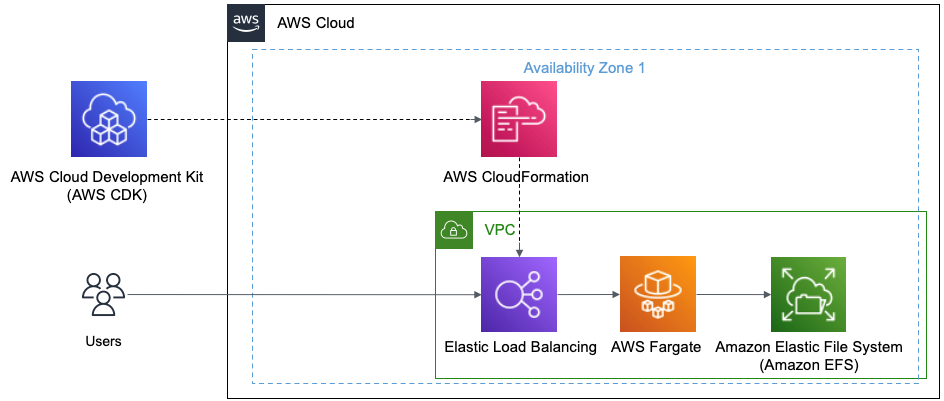
The following diagram illustrates the solution architecture. The dashed lines indicate the AWS CDK deployment.

Figure 1 This diagram shows AWS CDK and how it deploys using AWS CloudFormation to create the Elastic Load Balancer, AWS Fargate, and Amazon EFS

Figure 1 This diagram shows AWS CDK and how it deploys using AWS CloudFormation to create the Elastic Load Balancer, AWS Fargate, and Amazon EFS

You’ll be using the following:

  1. The Jenkins controller URL backed by an Application Load Balancer (ALB).
  2. You’ll be using your default Amazon Virtual Private Cloud (Amazon VPC) for this example.
  3. The Jenkins controller runs as a service on Amazon ECS using Fargate as the launch type. You’ll use Amazon Elastic File System (Amazon EFS) as a persistent backing store for the Jenkins controller task. The Jenkins controller and Amazon EFS are launched in private subnets.

Prerequisites

For this post, you’ll utilize AWS CDK using TypeScript.

Follow this guide on Getting Started for AWS CDK to:

  • Get your local environment setup
  • Bootstrap your development account

TOP 50 GIT Interview Q&A


Code

Please review the code used to define the Jenkins environment in AWS using AWS CDK.

Setup your imports

import { Duration, IResource, RemovalPolicy, Stack, Tags } from 'aws-cdk-lib';
import { Construct } from 'constructs';

import * as cdk from 'aws-cdk-lib';

import * as ecs from 'aws-cdk-lib/aws-ecs';
import * as efs from 'aws-cdk-lib/aws-efs';
import { Port } from 'aws-cdk-lib/aws-ec2';
import * as elbv2 from 'aws-cdk-lib/aws-elasticloadbalancingv2';

Setup your Amazon ECS, which is a logical grouping of tasks or services and set vpc

export class AppStack extends Stack {
  constructor(scope: Construct, id: string, props?: cdk.StackProps) {
    super(scope, id, props);

    const jenkinsHomeDir: string = 'jenkins-home';
    const appName: string = 'jenkins-cdk';

    const cluster = new ecs.Cluster(this, `${appName}-cluster`, {
      clusterName: appName,
    });

    const vpc = cluster.vpc;

Setup Amazon EFS to store the data

    const fileSystem = new efs.FileSystem(this, `${appName}-efs`, {
      vpc: vpc,
      fileSystemName: appName,
      removalPolicy: RemovalPolicy.DESTROY,
    });

Setup Access Points, which are application-specific entry points into an Amazon EFS file system that makes it easier to manage application access to shared datasets

const accessPoint = fileSystem.addAccessPoint(`${appName}-ap`, {
      path: `/${jenkinsHomeDir}`,
      posixUser: {
        uid: '1000',
        gid: '1000',
      },
      createAcl: {
        ownerGid: '1000',
        ownerUid: '1000',
        permissions: '755',
      },
    });

Setup Task Definition to run Docker containers in Amazon ECS

const taskDefinition = new ecs.FargateTaskDefinition(
      this,
      `${appName}-task`,
      {
        family: appName,
        cpu: 1024,
        memoryLimitMiB: 2048,
      }
    );

Setup a Volume mapping the Amazon EFS from above to the Task Definition

taskDefinition.addVolume({
      name: jenkinsHomeDir,
      efsVolumeConfiguration: {
        fileSystemId: fileSystem.fileSystemId,
        transitEncryption: 'ENABLED',
        authorizationConfig: {
          accessPointId: accessPoint.accessPointId,
          iam: 'ENABLED',
        },
      },
    });

Setup the Container using the Task Definition and the Jenkins image from the registry

const containerDefinition = taskDefinition.addContainer(appName, {
      image: ecs.ContainerImage.fromRegistry('jenkins/jenkins:lts'),
      logging: ecs.LogDrivers.awsLogs({ streamPrefix: 'jenkins' }),
      portMappings: [{ containerPort: 8080 }],
    });

Setup Mount Points to bind ephemeral storage to the container

containerDefinition.addMountPoints({
      containerPath: '/var/jenkins_home',
      sourceVolume: jenkinsHomeDir,
      readOnly: false,
    });

Setup Fargate Service to run the container serverless

    const fargateService = new ecs.FargateService(this, `${appName}-service`, {
      serviceName: appName,
      cluster: cluster,
      taskDefinition: taskDefinition,
      desiredCount: 1,
      maxHealthyPercent: 100,
      minHealthyPercent: 0,
      healthCheckGracePeriod: Duration.minutes(5),
    });
    fargateService.connections.allowTo(fileSystem, Port.tcp(2049));

Setup ALB and add listeners to checks for connection requests, using the protocol and port that you configure.

    const loadBalancer = new elbv2.ApplicationLoadBalancer(
      this,
      `${appName}-elb`,
      {
        loadBalancerName: appName,
        vpc: vpc,
        internetFacing: true,
      }
    );
    const lbListener = loadBalancer.addListener(`${appName}-listener`, {
      port: 80,
    });

Setup Target to route requests to Jenkins running on Amazon ECS using Fargate

const loadBalancerTarget = lbListener.addTargets(`${appName}-target`, {
      port: 8080,
      targets: [fargateService],
      deregistrationDelay: Duration.seconds(10),
      healthCheck: { path: '/login' },
    });
  }
}

Jenkins Deployment

Now that you have all the code, let’s deploy the AWS CDK definition:

  1. Make sure that you have done the Prerequisite steps from earlier.
  2. Install packages by running the following command in your IDE CLI:
npm i
  1. Now you’ll deploy your AWS CDK definition to your dev account:
cdk deploy

Let’s now login to Jenkins

  1. In your browser, use the DNS Name from the deployed Load Balancer
  2. On Amazon CloudWatch, there will be a Log group that will be created that is associated to Cluster Service.
    1. Go into that log and you’ll see it output the Password to login to Jenkins
  1. In Jenkins, follow the wizard to continue the setup

Cleaning up

To avoid incurring future charges, delete my resources.

Let’s destroy our deploy solution

  1. From your IDE CLI:
cdk destroy

Conclusion

With this overview we were able to cover the following:

  • Build an Elastic Load Balancer
  • Use AWS Fargate with Jenkins AMI
  • All resources running serverlessly
  • All build using AWS CDK


************************************************

✍️AUTHOR: LinkedIn Profile

************************************************

Learn (API-Microservice)Testing+ Selenium UI Automation-SDET with Self Paced Videos prepared by FAANG employee and LIVE Doubt Session 

SDET TRANING VIDEOS AVAILABLE with Live Doubt Session(course-1 below,API TRaining Videos With Class Notes and Coding Set) and (API+UI, both course-1 & 2 below) Check Training Page for Course Content or reach out @whatsapp +91-9619094122. 
This includes classnotes, 300+ interview questions, 3 projects, Java Coding question set for product companies along with career guidance from FAANG employees for Automation and SDET.

For more details whatsapp : https://lnkd.in/dnBWDM33


*************************************************

SeleniumWebdriver Automation Testing Interview Questions:

https://automationreinvented.blogspot.com/search/label/SeleniumWebdriver

API Testing Interview Question Set:

https://automationreinvented.blogspot.com/2022/03/top-80-api-testing-interview-questions.html

DevOps Interview Q&A:

https://automationreinvented.blogspot.com/2021/11/top-11-devops-interview-questions-and.html 

Kubernetes Interview Question Set

https://automationreinvented.blogspot.com/search/label/Kubernetes

Docker Interview Question Set

https://automationreinvented.blogspot.com/Docker

Linux Interview question Set

https://automationreinvented.blogspot.com/search/label/Linux

Automation Testing/SDET Framework Design

https://automationreinvented.blogspot.com/search/label/FrameworkDesign

Java Related Interview Question Set

https://automationreinvented.blogspot.com/search/label/Java

GIT Interview Question Set:

https://automationreinvented.blogspot.com/2021/09/top-40-git-interview-questions-and.html

Coding Interview Question Set:

https://automationreinvented.blogspot.com/search/label/Coding%20Questions

Mobile Testing Interview Question Set:

https://automationreinvented.blogspot.com/search/label/Mobile%20Testing

Python Interview Question Set for QAE - SDET - SDE:

https://automationreinvented.blogspot.com/search/label/Python


All Time Popular Posts

Most Featured Post

𝗦𝘁𝗶𝗹𝗹 𝘀𝘁𝗿𝘂𝗴𝗴𝗹𝗶𝗻𝗴 𝘄𝗶𝘁𝗵 𝗝𝗮𝘃𝗮 𝗰𝗼𝗱𝗶𝗻𝗴 𝗿𝗼𝘂𝗻𝗱𝘀?

❓ 𝗦𝘁𝗶𝗹𝗹 𝘀𝘁𝗿𝘂𝗴𝗴𝗹𝗶𝗻𝗴 𝘄𝗶𝘁𝗵 𝗝𝗮𝘃𝗮 𝗰𝗼𝗱𝗶𝗻𝗴 𝗿𝗼𝘂𝗻𝗱𝘀? The issue isn’t your logic—it’s the lack of pattern recogniti...